A Squarespace site is ready for AI search when AI tools can reach it, understand what your business does, and find clear answers they can trust and quote. You can check this yourself with an eight-point checklist: crawler access, page titles and descriptions, heading structure, direct answers and FAQs, structured data, consistent business information, content depth and freshness, and basic site health. Below, we explain each check and where to fix it in Squarespace.
Squarespace sites tend to look great. That is one of the reasons people choose the platform. But AI tools do not see your site the way a visitor does. They do not admire your photography or your layout. They read the text, the page structure, and the code behind the scenes, and they decide whether your business is clear and trustworthy enough to mention.
That means a beautiful site can still be hard for an AI tool to use. Maybe the key information is inside an image. Maybe your services page has three vague sentences. Maybe a setting is quietly telling certain crawlers to stay away. None of these problems are visible to you when you look at your own website, which is why a check-up is worth doing.
This post gives you a practical, plain-language checklist you can run in an afternoon. If you are new to the idea behind it, What Is GEO (Generative Engine Optimization) and Why Your Business Needs It is a good place to start, and AI Search vs. Google Search: What Small Business Owners Need to Know in 2026 explains how the two kinds of search differ.
What does it mean for a site to be "ready" for AI search?
Being ready does not mean you are guaranteed to appear in ChatGPT, Perplexity, Gemini, Claude, Copilot, or Google's AI Overviews. No one can promise that. Being ready means you have removed the obstacles and made it easy for these tools to understand you.
In practice, that comes down to three questions:
Can AI tools reach your content? If they cannot crawl your pages, nothing else matters.
Can they understand it? Clear titles, headings, and structured data tell them what each page is about.
Can they trust it? Consistent details, helpful depth, fresh information, and outside mentions all build confidence.
The checklist below is organized around those three questions.
The 8-point Squarespace AI readiness checklist
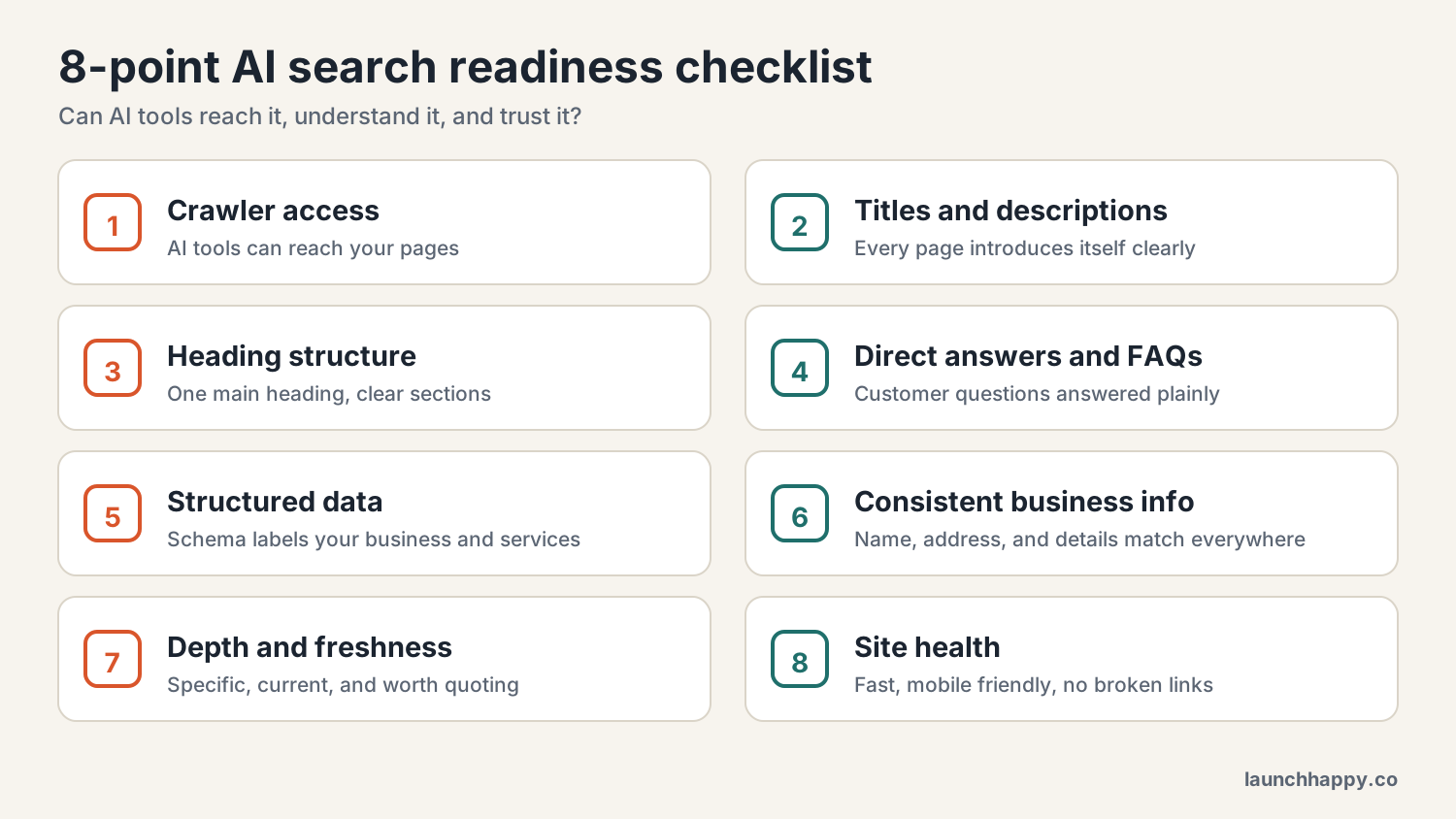
1. Crawler access: can AI tools reach your site?
AI tools use automated programs called crawlers to read websites. Squarespace includes settings that let you control which crawlers are allowed in. Some site owners switch these off to protect their content, and that is a valid choice. But if your goal is to be mentioned by AI tools, you want to make sure you have not blocked them by accident.
How to check: Look in your Squarespace site settings for the crawler or AI crawler options and review what is allowed. You can also view your site's robots.txt file by typing your web address followed by /robots.txt into a browser. It lists which crawlers are allowed or blocked.
Also check: Pages you have set to "not linked" or hidden behind a password cannot be read by crawlers. If an important page is hidden, it is invisible to AI tools too.
2. Page titles and descriptions: does each page introduce itself clearly?
Every page on your site has an SEO title and an SEO description. These are short summaries that search engines and AI tools use to understand what the page is about. Many Squarespace sites leave them blank, which means Squarespace fills in something generic, like your site name and the page name.
How to check: Open each important page's settings and look at the SEO tab. Does the title say what the page is, in plain words? Does the description explain who the page is for and what they will find?
A good example: Instead of "Services | Harper Studio," try "Wedding Photography Packages in Denver | Harper Studio." It tells a person and a machine exactly what the page covers.
3. Heading structure: can the page be skimmed?
Headings are the outline of your page. AI tools use them to figure out how a page is organized and to find the section that answers a question. A common Squarespace problem is using heading styles for looks instead of meaning, for example making a line of text a Heading 1 because the font is big, or skipping from a Heading 1 straight to a Heading 4.
How to check: Each page should have one main heading (Heading 1) that says what the page is about. Break the rest of the page into sections with Heading 2s, and use Heading 3s for sub-points. Where it makes sense, write your headings as the questions your customers ask, like "How much does a brand photo session cost?"
Also check: Text that lives inside an image cannot be read by AI tools. If your pricing, services, or key details are in a graphic, add them as real text on the page as well.
4. Direct answers and FAQs: do you answer the real questions?
This is where many small business sites fall short. AI tools look for pages that answer a question clearly. If a customer would ask "How long does a website project take?" and your site never says, an AI tool has nothing to quote.
How to check: Write down the ten questions you get most often by email, on calls, and in consultations. Search your site for the answers. For each one, ask: is the answer stated plainly, in the first sentence or two of its section?
How to fix it: Add a short answer at the top of each service page, then add an FAQ section near the bottom. In Squarespace, you can build FAQs with accordion blocks or simple heading-and-text sections. Keep answers specific, such as real timelines, price ranges or how pricing works, who the service is for, and what is included.
5. Structured data: are you speaking the machine's language?
Structured data, also called schema markup, is a block of code that labels the information on your page. It tells machines "this is a local business, here is the address, here are the services, here is an FAQ." Squarespace adds some structured data automatically for certain content, like blog posts and products. But your business details, services, and FAQs usually need custom schema.
How to check: Paste one of your page addresses into Google's Rich Results Test or the Schema Markup Validator, both free. They show what structured data was found on the page.
How to fix it: Adding custom schema generally means using code injection in Squarespace, and whether you can do that depends on your plan. If code is not your thing, this is a good step to hand to someone who can add it correctly. Bad schema can cause more harm than none.
6. Consistent business information: do all your listings agree?
AI tools collect information from many places and compare it. If your website says you are "Harper Photo Studio," your Instagram says "Harper Studios," and an old directory lists a different phone number, the tools have a harder time trusting any of it.
How to check: Search for your own business name and look at the first two pages of results, plus your Google Business Profile, Facebook page, Instagram bio, and any directories you are listed in. Write down the name, address or service area, phone number, hours, and description for each. Look for differences.
How to fix it: Pick one official version of each detail and update everything to match. On Squarespace, fill in your business information in your site settings and make sure the footer and contact page use the same wording.
7. Depth and freshness: is your content worth quoting?
Short, generic pages are hard to cite. So are pages that have not been touched in years. AI tools prefer pages that show real knowledge and look current.
How to check: Open your main service pages. Do they explain your process, who you work with, and what makes your approach different? Or do they say something that could apply to any business in your field? Then check dates: do you mention packages, prices, or events that are out of date?
How to fix it: Add the specifics only you can offer, like your process, typical timelines, examples of the kind of clients you serve, and honest answers to common concerns. Then set a reminder to review your key pages every three to six months.
8. Site health: does everything load and work?
AI tools and search engines both struggle with sites that are slow, broken, or confusing on mobile.
How to check: Run your main pages through Google's PageSpeed Insights, which is free. Look for oversized images, broken links, and pages that take a long time to load on a phone.
How to fix it: On Squarespace, the biggest wins usually come from compressing large images before you upload them, removing unused pages and extra animations, and fixing any links that lead to missing pages.
The five-question test: what happens when you ask AI?
A checklist tells you about your website. This test tells you about your results. It takes about ten minutes.
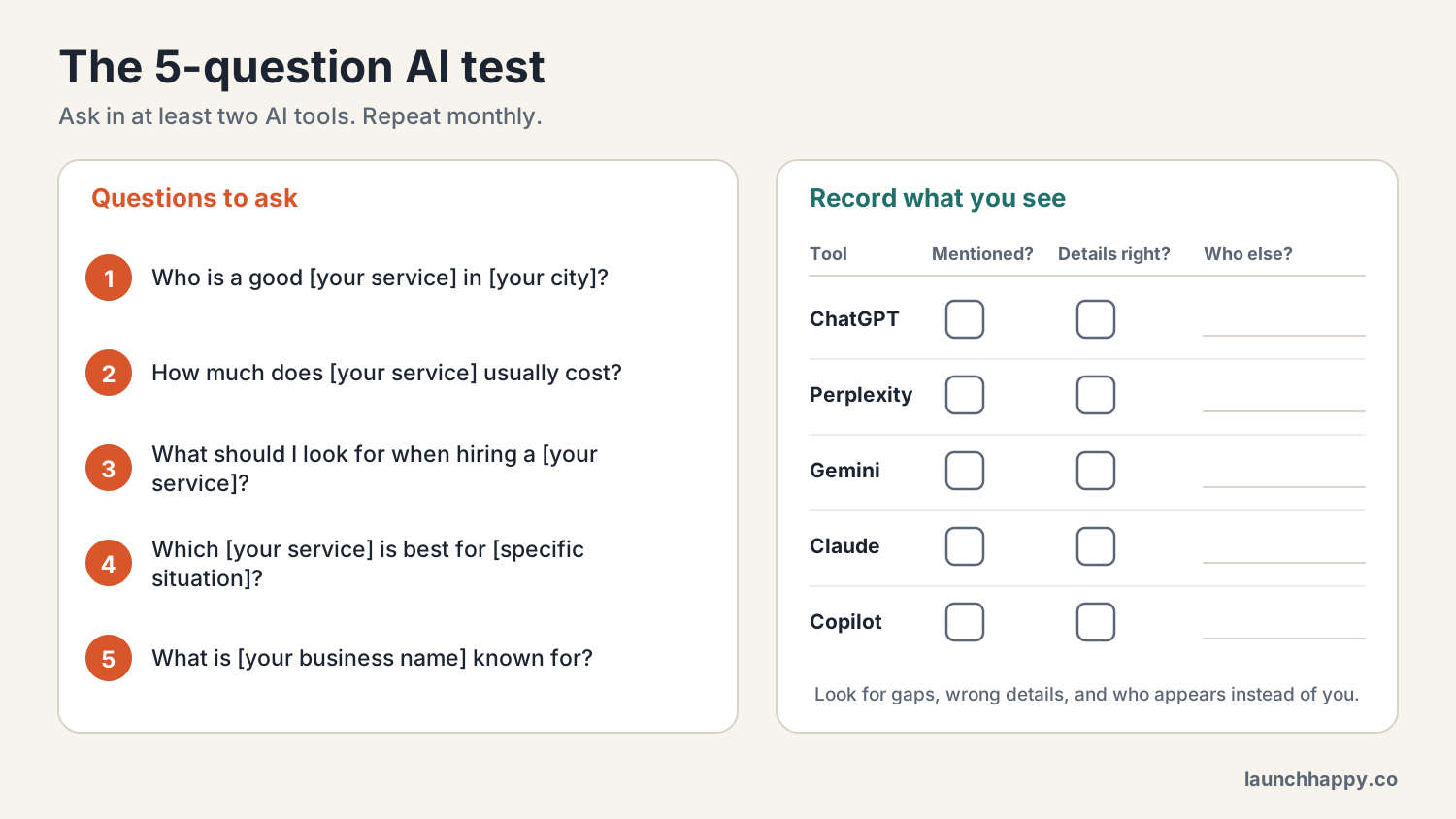
How to run it:
Write five questions your ideal customer would ask. Use real wording, not marketing language.
Ask each question in at least two AI tools, such as ChatGPT, Perplexity, Gemini, Claude, or Copilot.
For each answer, record three things: were you mentioned, was the information accurate, and which competitors or sources appeared instead.
Repeat once a month. AI answers change, so one snapshot is only a starting point.
What the results can tell you:
If you are never mentioned, start with checks 4, 5, and 7. Your site may not be giving AI tools enough clear, quotable material.
If you are mentioned but the details are wrong, start with check 6. Conflicting information is the most common cause.
If a competitor keeps appearing, look at their website. Notice how they structure their pages and answer questions, and learn from it without copying.
Where to fix each item in Squarespace
Not everything lives in the same place, so here is a quick map.
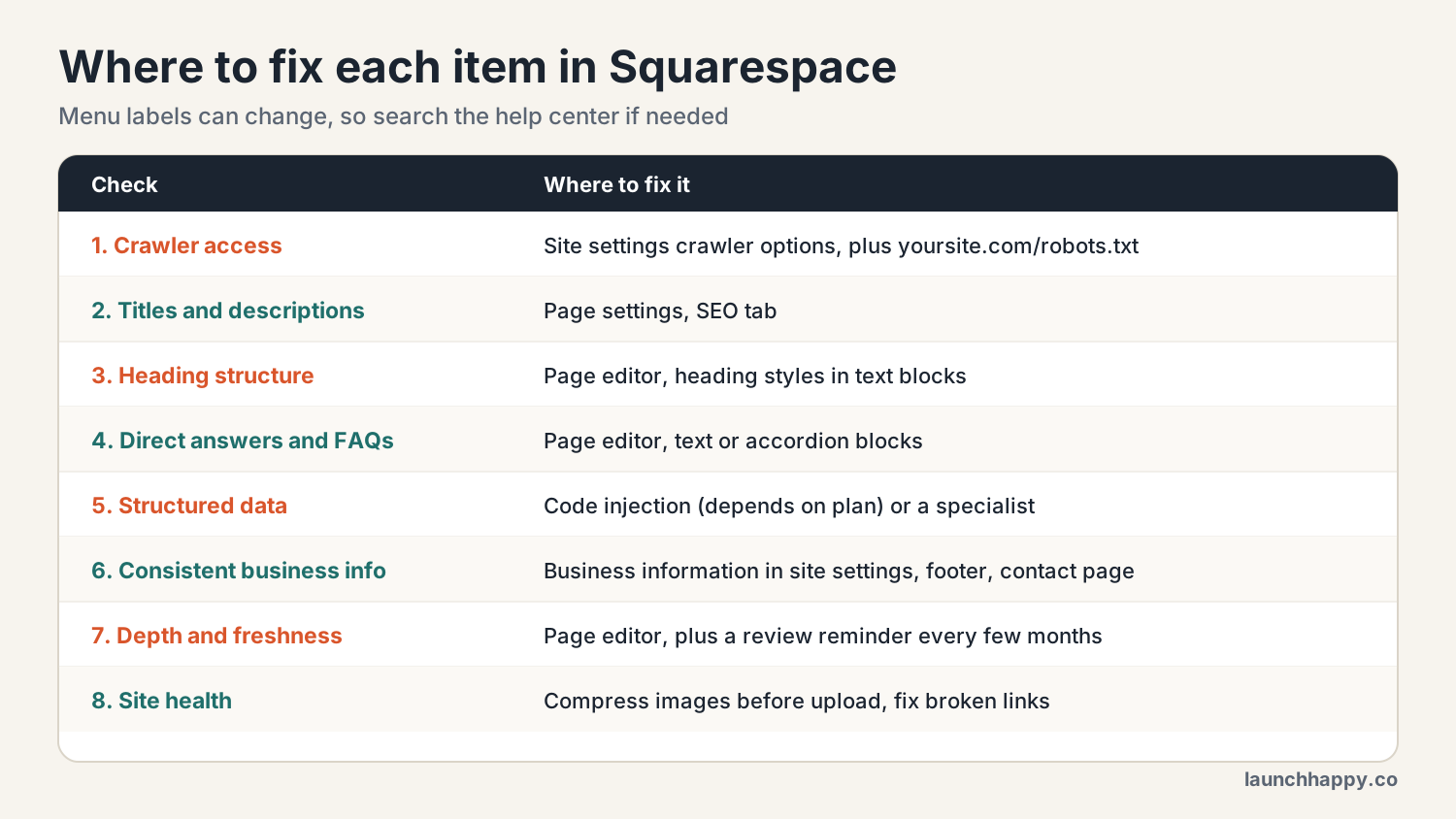
A note on menus: Squarespace updates its interface from time to time, so the exact labels may shift. If you cannot find a setting, search the Squarespace help center for the name of the setting, or ask us.
What is the free AI Visibility Report?
Doing the full checklist by hand is worth it, but it takes time, and some checks, like structured data, are easy to get wrong without experience. That is why we built the free AI Visibility Report.
The report scores your site out of 100 on the structural signals AI tools rely on, including structured data, content depth, headings, technical health, freshness, how clearly your business is identified, and how well your pages give direct answers. It shows you where the biggest gaps are, so you know what to fix first instead of guessing.
To get it, book a free discovery call with us. We will run the report on your site as part of that conversation, so you have a clear baseline for how your site is set up for AI search today and exactly where to focus. After the call, we can send you a tailored proposal and quote if you would like help making the fixes.
If you want a deeper, ongoing approach, our GEO Certified program is built around the same criteria and gives your site a clear standard to work toward. As always, we cannot promise that any AI tool will mention your business, but we can help give you the opportunity by making your site as clear and easy to use as possible.
How often should I run this check?
A full check once or twice a year is a good rhythm, with a quick review of your most important pages every few months. Run it again any time you redesign your site, change your services or prices, move locations, or notice that AI tools are describing your business inaccurately.
Frequently asked questions
How do I know if my Squarespace site is ready for AI search? Check that AI crawlers can access your site, that each page has a clear title, description, and heading structure, that your pages answer real customer questions, that structured data is in place, that your business details are consistent everywhere, and that your content is helpful and current. The checklist in this post covers all of these.
Does Squarespace block AI crawlers by default? Squarespace gives you settings to control which crawlers can access your site. Because defaults and options can change, check your current site settings and your robots.txt file to see what is allowed.
Do I need to know how to code to get ready for AI search? No, for most of it. Titles, descriptions, headings, FAQs, and business information are all editable in Squarespace without code. Custom schema markup is the main exception, and it often requires code injection, which depends on your plan.
What is schema markup and does my Squarespace site need it? Schema markup is code that labels your content so machines can understand it, such as your business details, services, and FAQs. Squarespace adds some automatically, but most business sites benefit from custom schema as well.
What does the free AI Visibility Report include? It scores your site out of 100 on the structural signals AI tools rely on, including structured data, content depth, headings, technical health, freshness, entity clarity, and direct-answer formatting, and it highlights the biggest gaps to fix first.
Can I test whether ChatGPT mentions my business? Yes. Ask the questions your customers would ask in ChatGPT and at least one other AI tool, and note whether your business appears and whether the details are correct. Repeat monthly, because answers change.
Key takeaways
A site is ready for AI search when AI tools can reach it, understand it, and trust it.
Eight checks cover the essentials: crawler access, titles and descriptions, headings, direct answers, structured data, consistent business information, depth and freshness, and site health.
Most fixes happen inside Squarespace with no code. Custom schema is the main exception.
The five-question test shows how you appear in AI tools today.
No one can guarantee a mention, but you can remove the obstacles and improve your opportunity.
Our free AI Visibility Report gives you a baseline and a clear place to start.
Keep reading: What Is GEO (Generative Engine Optimization) and Why Your Business Needs It and AI Search vs. Google Search: What Small Business Owners Need to Know in 2026